Know every ingredient in every batch, and every customer who got one.
SmartTrace is traceability software made for small food producers. Scan deliveries in, make batches from your recipes, dispatch to customers, and trace any lot or batch in seconds when someone asks.
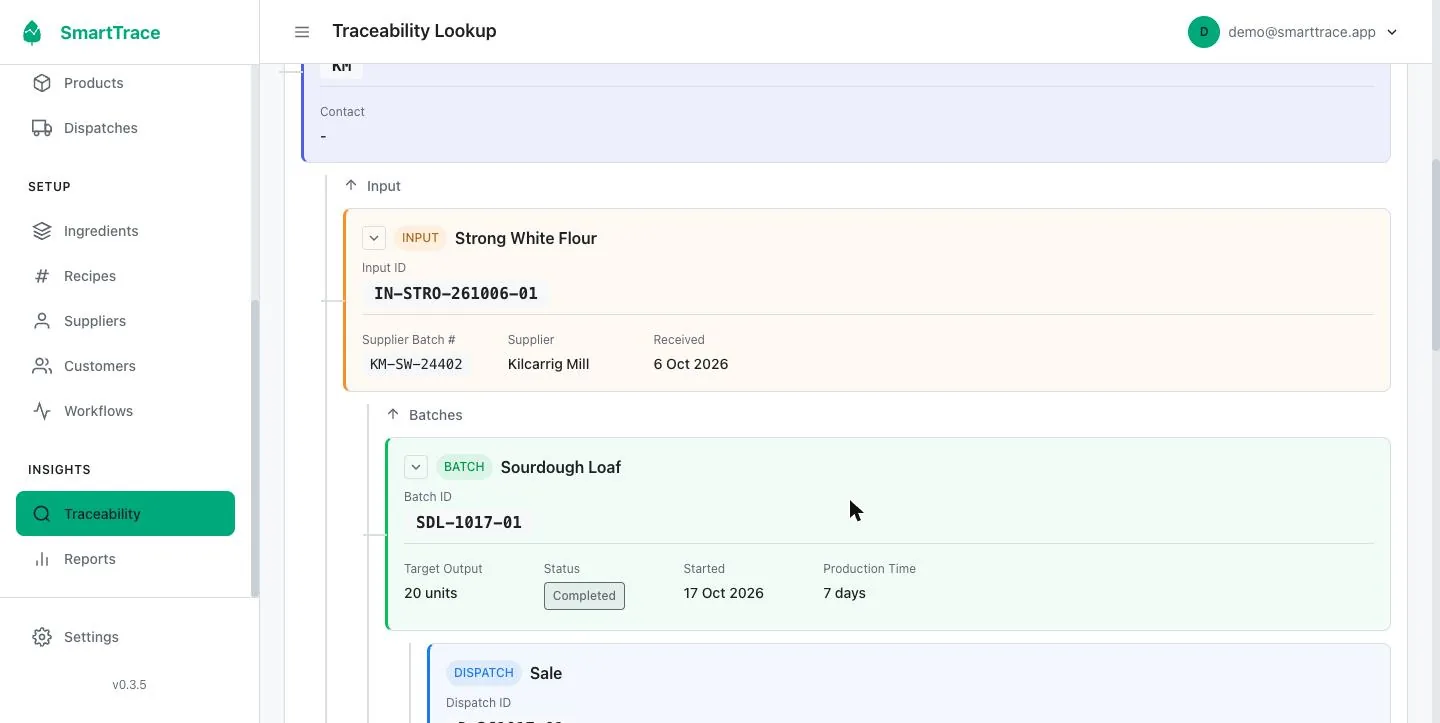
- Supplier lotStrong White Flour, Kilcarrig MillKM-SW-24402
- Delivery, 6 Oct100 kg received and scanned inIN-STRO-261006-01
- Batch, 17 OctSourdough Loaf, 20 unitsSDL-1017-01
- Dispatch, 17 Oct12 loaves to The Copper Kettle CaféD-261017-01
- Dispatch, 17 Oct8 loaves to Marlay DeliD-261017-02
Paper records work until the day someone rings.
A supplier recalls a lot of flour. An inspector asks which customers got Tuesday's batch. A customer says a jar tasted off. With a diary and a box of delivery dockets you can answer, eventually, after an evening at the kitchen table.
SmartTrace records the same things you record now, just once, in the order you already do them. The difference is that every record is linked to the one before it, so when someone asks, SmartTrace puts the whole answer together for you in seconds. No digging through dockets, no evening at the kitchen table.
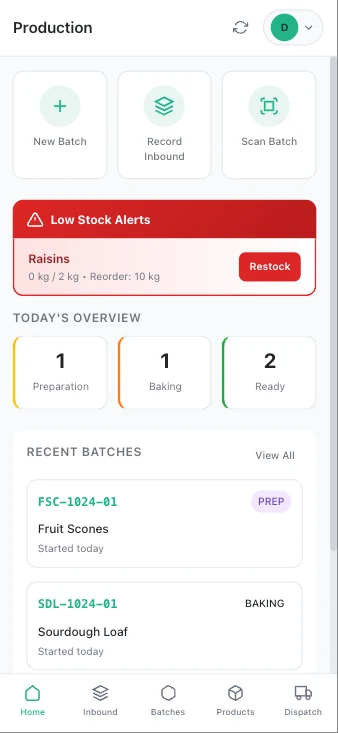
Three records a day. One complete chain.
Everything in SmartTrace hangs off three things you do anyway.
Record what comes in
Scan or photograph the supplier's label. SmartTrace reads the product, lot number and best before date for you. Stock levels update on their own.
Make a batch
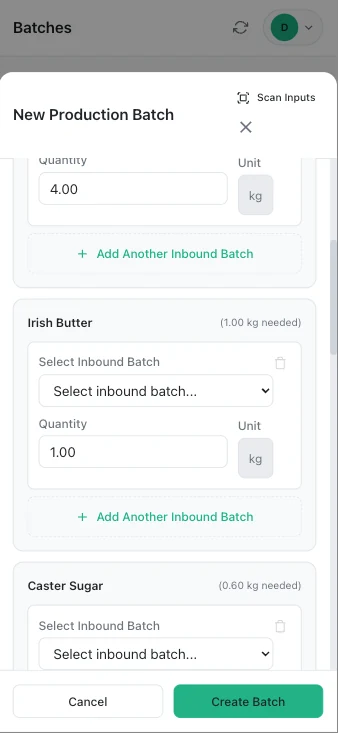
Pick a recipe and a quantity. SmartTrace lists the ingredients you need and asks which delivery each one came from. Print a label for the batch.
Send it out
Choose the batches going to a customer and record the dispatch. Waste and shop use are recorded the same way, so your numbers add up.
A phone app for the floor. A desktop for the office. One account.
SmartTrace shows the right version for the screen you open it on. Same login, same records, everywhere.
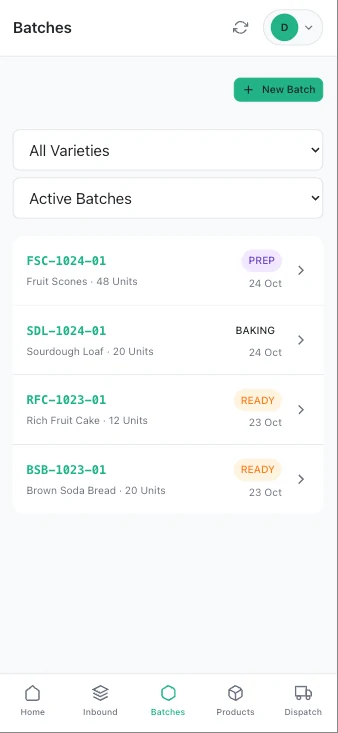
On a phone or tablet, in the kitchen, the shed or the van
Day to day recording
- Scan deliveries in with the camera
- Start batches from recipes
- Move batches through your stages
- Record dispatches and print labels
- Look up any batch by scanning its label
- Works on any phone, no app store needed
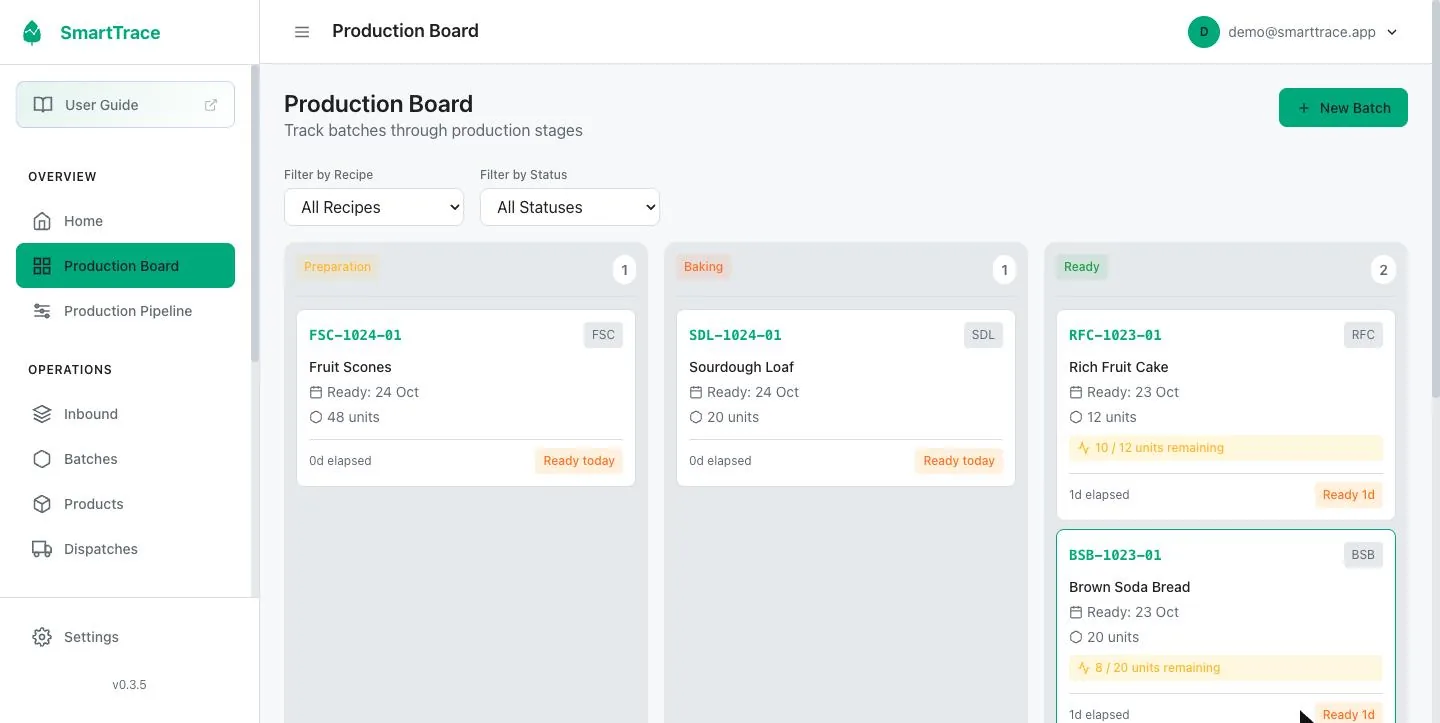
On a laptop or desktop, in the office or at the kitchen table
Setup, oversight and reports
- Set up ingredients, recipes, suppliers and customers
- Production board across every batch
- Instant traceability reports, forwards and backwards
- Reports with CSV export for your accountant or inspector
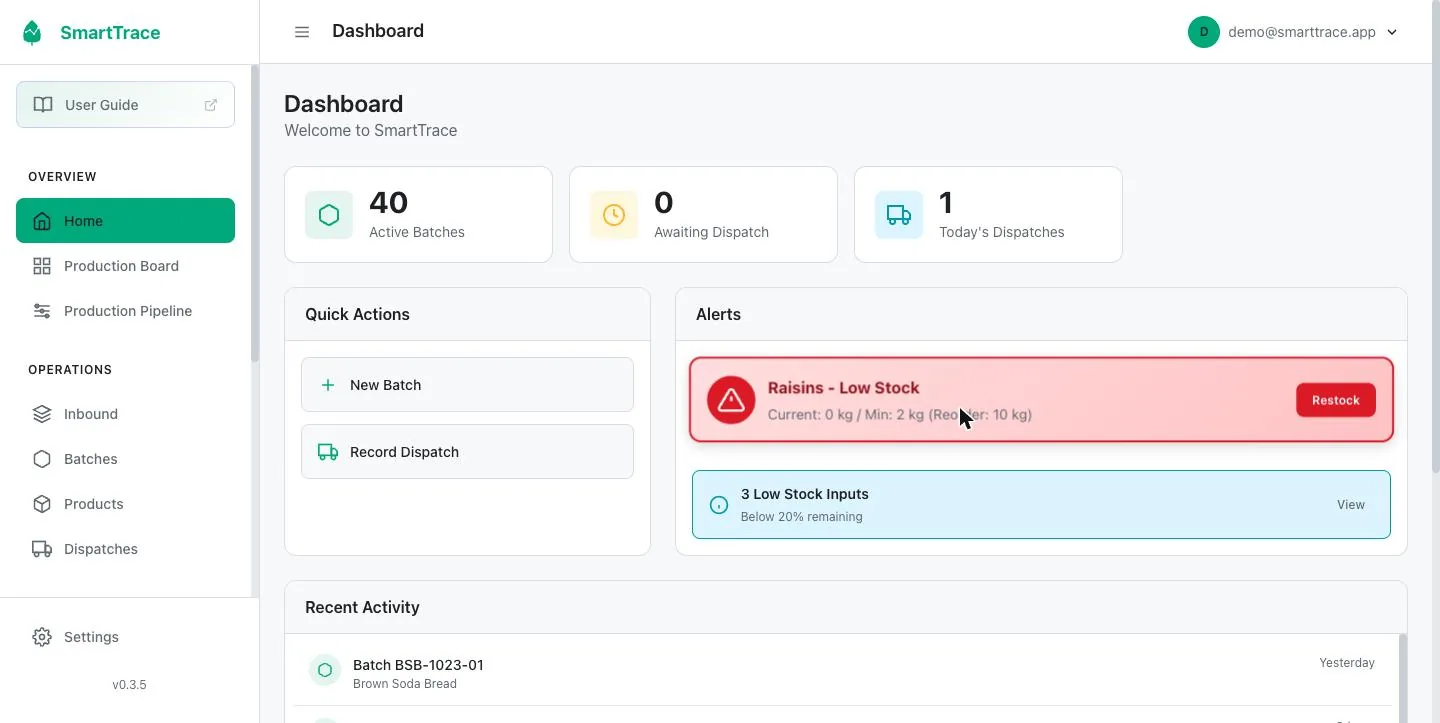
- Stock levels and low stock alerts
- Team members, roles and settings
Why we set it up with you, not a wizard
SmartTrace isn't hard to use. But it has to be shaped to your production before the first day, and that's a conversation, not a form.
Every producer has a workflow: the stages a batch goes through from start to finished. A bakery's is Preparation, Baking, Ready. A grower's is Sown, Growing, Ready to harvest, with stages that move on by themselves after set days. A cook chill kitchen adds Chilling and Portioning. Get the stages right and the production board, the ready dates and the reports all make sense. Get them wrong and nothing lines up.
The same goes for recipes (what goes into each product, in what quantities, for a standard batch), units (kilos, litres, trays, portions, units) and how your suppliers' lot numbers and customers are set up.
These are decisions, and they're easy to make with someone who's set up a lot of producers and hard to make alone on a screen. So we ring you, ask about how you actually work, and set it all up with you. Usually under an hour, always free.
You then try it for a week with records that are right from day one, so the trial tells you something real.
What we set up on the call
- Your production stages (the workflow)
- Units you measure in
- Ingredients you buy and who supplies them
- Your recipes, with quantities for a standard batch
- Shelf life for each product
- Your customers
- Your label printer, if you have one
- Anyone else on your team who needs a login
What's in the box
Everything below is included at €25 a month. There are no tiers and nothing to unlock.
Label reading by camera
Photograph a supplier label and SmartTrace reads the product, lot number and dates into the delivery record.
Recipes that prompt you
Set up each product once. When you start a batch, SmartTrace lists the ingredients and quantities and asks which delivery each came from.
Production board
See every batch at its current stage. Stages are yours to name: proving and baking, growing and harvesting, cooking and chilling.
Products made from several batches
Hampers, mixed boxes and meal kits are assembled from batches, and the trace follows every part.
Dispatches, waste and shop use
Record what left and where it went. Waste and internal use are recorded the same way so stock and output reconcile.
Instant traceability report
Type in a lot number, batch, customer or dispatch and SmartTrace pulls the whole history together for you: where it came from and everyone who got it. Print it or export it.
QR labels and scanning
Label your ingredient deliveries and your batches. Scan an ingredient to add it to a batch, or a batch to add it to a dispatch, instead of picking from lists.
Stock and expiry alerts
Set a minimum for each ingredient. SmartTrace tells you when you're low and what's near its best before date.
Reports and CSV export
Production, dispatch and ingredient usage reports for any date range, exportable to a spreadsheet.
Unlimited team members
Add everyone who touches production. Give each person the access they need and no more.
Any phone, tablet or computer
No app store and nothing to keep updated. Add it to your phone's home screen and it opens like an app.
Your data, backed up
Records are stored securely in the cloud with nightly off-site backups. Export your data whenever you like.
The report you hope you never need, ready in seconds.
Type in a supplier's lot number and SmartTrace does the rest. In seconds it shows the delivery it arrived on, every batch it went into, and every customer who received those batches. Start from a customer instead and it works the other way, back to the suppliers. You don't go looking through anything; the system does it for you.
Print it, export it to Excel, or hand the inspector your phone.
Recipes do the remembering.
Set up a recipe once with its ingredients and quantities. Every time you start a batch, SmartTrace scales the recipe to the quantity you're making and asks which delivery each ingredient came from. Scan the bag or pick it from the list.
If stock is short or an ingredient is missing, it tells you before you start, not after.
Built around how a small producer actually works.
SmartTrace grew out of work with real producers, from a microgreens grower to a bakery to a school meals kitchen. It has been shaped by the messy days: the half-used bag, the batch split between three customers, the loaves kept back for the shop.
It's one price, one login, and it fits in your pocket.
Producers using SmartTrace
“Quote one.”Name, Business
“Quote two.”Name, Business
“Quote three.”Name, Business
- Set up with you on a call, free
- 7 days to try it with real work, no card
- No contract, cancel any time
- 30 day money back guarantee
- Phone app and desktop in one account
One price. No surprises.
Traceability software has mostly been built for factories, and priced like it. SmartTrace is priced for a business where the owner is also the baker.
Every account is set up by a person who knows food production, not a wizard. We ring you, build your recipes and stages with you, and you try it for a week before paying anything.
€25 a month is less than an hour of your time, and it buys back far more than an hour the first time someone asks you where a lot went.
The only equipment you might add is a label printer, and the one we recommend costs about €65. More on labels and printing.
Made for producers like you
Same software, set up for the way each kind of producer works. Pick yours.
Common questions
What is SmartTrace?
SmartTrace is traceability software for small food producers. You record what arrives (with the supplier's batch or lot number), what you make from it, and who you sent it to. Then you can trace any batch forwards to customers or backwards to suppliers in seconds.
Who is it for?
Small and medium food producers who make something and sell it on: bakeries, growers, ready meal kitchens, cheesemakers, preserve makers, butchers, caterers, roasters and more. If you have ingredients coming in and product going out, it fits.
Do I need any special equipment?
No. It runs in the web browser on any phone, tablet or computer you already own. A label printer is optional. The one we recommend, the Phomemo M221, costs about €60 to €70 and works through our free Android app.
How much does it cost?
€25 a month, everything included, unlimited batches and unlimited users. No contract, cancel any time. Setup is free and done with you on a call, you get 7 days to try it, and there's a 30 day money back guarantee after you subscribe.
What is a workflow?
The stages a batch goes through from start to finished, for example Preparation, Baking, Ready for a bakery, or Sown, Growing, Ready to harvest for a grower. SmartTrace shows your batches by stage on the production board and works out ready dates from it. We set your workflow up with you on the setup call.
Is it hard to set up?
We do it with you. When you sign up we ring you within a working day and set up your production stages, recipes, suppliers and customers together, usually in under an hour. After that, day to day work is mostly scanning and tapping.
Is there an app to download?
There's no app store involved. SmartTrace runs in the web browser on any phone, tablet or computer. On a phone you can add it to your home screen in two taps, and from then on it opens like any other app.
Is this what an inspector wants to see?
Inspectors want to see that you can identify what went into a product and where it went, one step back and one step forward, and produce that quickly. SmartTrace gives you that as a printable or exportable report from any batch, lot number, customer or dispatch.
Start tracing your production this week.
Sign up and we'll ring you within a working day to set it up together, free. Try it for 7 days, then €25 a month with a 30 day money back guarantee.